Description
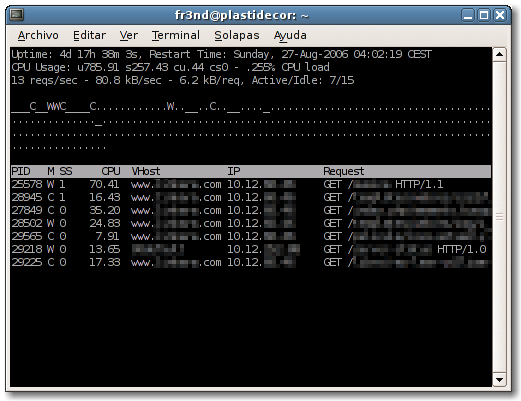
apache-top provides real-time display of the active processes from a remote apache server. I’ts like the top linux command.
With apache-top you can get:
- The active apache processes with their associated PID, the status, the seconds being active, the CPU usage, the asociated VirtualHost, the accessing ip and the request (POST or GET, the file being accessed and the used protocol)
- The server uptime and the last time it was restarted
- The CPU usage
- Requests by second, Kb by second and the average Kb by request
- Number of active and inactive processes
- A graph with the inactive and active processes and their status
Requeriments
- python 2.4
- Apache 2.0 webserver with mod_status and the ExtendedStatus directive activated. You will also need to be allowed to access from your ip address.
Download
Examples
To see statistics from the webserver 192.168.0.1:
apache-top -u http://192.168.0.1/server-status
If for any reason we don’t have direct access to 80 port, a tunel can be createdusing ssh:
ssh -L 8080:localhost:80 192.168.0.1
And we run this command in other terminal:
apache-top -u http://localhost:8080/server-status
Links
Screenshots
License
apache-top uses GNU/GPL License.
Thanks for this project! This is exactly what I’m looking for. apachetop is good, but it is totaly useless in case you have different access log for every virutal host.
In program help (with ?) will be great.
Kepi, apache-top doesn’t use the access log to retrieve the information, so having different logs for every virtualhost doesn’t affect it
Is there an older version that works with Apache 1?
Chris: Sorry, but there is no version compatible with apache 1.
fr3nd: (reply to 2)
Yes, I know it! I talk about apachetop (the one without – :) as you said.. simmilar project with diferent approach). I like it but it is useless for me cause it depends on access logs.
And this is why I love your’s apache-top :) It saves my live many times from time i wrote here for the first time. Thanks again.
Hello, on a cPanel server when starting it:
./apache-top.py -u http://localhost/whm-server-status
ERROR parsing the data. Please, make sure you are alowed to read the server-status page and you have ExtendedStatus flag activated
What may be the problem ?
Thanks,
Docenta: Check you’re using apache 2.0 and try to access to that url using a “normal” browser to see if the server-status page works correctly.
Hey, thanks for writing it! I love it!
Hello
Ahm ill try to run it but i just recive a blank sreen. also cannot exit by q or ctrl-c must stop the przess and kill it by sigjkill
im running debian etch, python 2.4.4 and also an actual apache2
the status site is reachable by lynx on same terminal
get no error message nothing
same happens wenn i try to use a bad url
ok when i try it with debug form python (python -d apache-top…. ill recive an error wehn i run it on a bad url but still nothing when the url is corrent
anyone an idea?
now ife tryit with verbose and debug
below thats what i recieve
# /usr/lib/python2.4/httplib.pyc matches /usr/lib/python2.4/httplib.py
import httplib # precompiled from /usr/lib/python2.4/httplib.pyc
# /usr/lib/python2.4/mimetools.pyc matches /usr/lib/python2.4/mimetools.py
import mimetools # precompiled from /usr/lib/python2.4/mimetools.pyc
# /usr/lib/python2.4/rfc822.pyc matches /usr/lib/python2.4/rfc822.py
import rfc822 # precompiled from /usr/lib/python2.4/rfc822.pyc
# /usr/lib/python2.4/tempfile.pyc matches /usr/lib/python2.4/tempfile.py
import tempfile # precompiled from /usr/lib/python2.4/tempfile.pyc
# /usr/lib/python2.4/random.pyc matches /usr/lib/python2.4/random.py
import random # precompiled from /usr/lib/python2.4/random.pyc
dlopen(“/usr/lib/python2.4/lib-dynload/math.so”, 2);
import math # dynamically loaded from /usr/lib/python2.4/lib-dynload/math.so
dlopen(“/usr/lib/python2.4/lib-dynload/binascii.so”, 2);
import binascii # dynamically loaded from /usr/lib/python2.4/lib-dynload/binascii.so
dlopen(“/usr/lib/python2.4/lib-dynload/_random.so”, 2);
import _random # dynamically loaded from /usr/lib/python2.4/lib-dynload/_random.so
dlopen(“/usr/lib/python2.4/lib-dynload/fcntl.so”, 2);
import fcntl # dynamically loaded from /usr/lib/python2.4/lib-dynload/fcntl.so
import thread # builtin
dlopen(“/usr/lib/python2.4/lib-dynload/cStringIO.so”, 2);
import cStringIO # dynamically loaded from /usr/lib/python2.4/lib-dynload/cStringIO.so
vpn:/bin/wartung# python -d -v apache-top -u http://localhost/server-status
# installing zipimport hook
import zipimport # builtin
# installed zipimport hook
# /usr/lib/python2.4/site.pyc matches /usr/lib/python2.4/site.py
import site # precompiled from /usr/lib/python2.4/site.pyc
# /usr/lib/python2.4/os.pyc matches /usr/lib/python2.4/os.py
import os # precompiled from /usr/lib/python2.4/os.pyc
import posix # builtin
# /usr/lib/python2.4/posixpath.pyc matches /usr/lib/python2.4/posixpath.py
import posixpath # precompiled from /usr/lib/python2.4/posixpath.pyc
# /usr/lib/python2.4/stat.pyc matches /usr/lib/python2.4/stat.py
import stat # precompiled from /usr/lib/python2.4/stat.pyc
# /usr/lib/python2.4/UserDict.pyc matches /usr/lib/python2.4/UserDict.py
import UserDict # precompiled from /usr/lib/python2.4/UserDict.pyc
# /usr/lib/python2.4/copy_reg.pyc matches /usr/lib/python2.4/copy_reg.py
import copy_reg # precompiled from /usr/lib/python2.4/copy_reg.pyc
# /usr/lib/python2.4/types.pyc matches /usr/lib/python2.4/types.py
import types # precompiled from /usr/lib/python2.4/types.pyc
# /usr/lib/python2.4/warnings.pyc matches /usr/lib/python2.4/warnings.py
import warnings # precompiled from /usr/lib/python2.4/warnings.pyc
# /usr/lib/python2.4/linecache.pyc matches /usr/lib/python2.4/linecache.py
import linecache # precompiled from /usr/lib/python2.4/linecache.pyc
import encodings # directory /usr/lib/python2.4/encodings
# /usr/lib/python2.4/encodings/__init__.pyc matches /usr/lib/python2.4/encodings/__init__.py
import encodings # precompiled from /usr/lib/python2.4/encodings/__init__.pyc
# /usr/lib/python2.4/codecs.pyc matches /usr/lib/python2.4/codecs.py
import codecs # precompiled from /usr/lib/python2.4/codecs.pyc
import _codecs # builtin
# /usr/lib/python2.4/encodings/aliases.pyc matches /usr/lib/python2.4/encodings/aliases.py
import encodings.aliases # precompiled from /usr/lib/python2.4/encodings/aliases.pyc
# /usr/lib/python2.4/encodings/iso8859_15.pyc matches /usr/lib/python2.4/encodings/iso8859_15.py
import encodings.iso8859_15 # precompiled from /usr/lib/python2.4/encodings/iso8859_15.pyc
Python 2.4.4 (#2, Apr 16 2008, 17:58:59)
[GCC 4.1.2 20061115 (prerelease) (Debian 4.1.1-21)] on linux2
Type “help”, “copyright”, “credits” or “license” for more information.
apache-top: inconsistent use of tabs and spaces in indentation
# /usr/lib/python2.4/HTMLParser.pyc matches /usr/lib/python2.4/HTMLParser.py
import HTMLParser # precompiled from /usr/lib/python2.4/HTMLParser.pyc
# /usr/lib/python2.4/markupbase.pyc matches /usr/lib/python2.4/markupbase.py
import markupbase # precompiled from /usr/lib/python2.4/markupbase.pyc
# /usr/lib/python2.4/re.pyc matches /usr/lib/python2.4/re.py
import re # precompiled from /usr/lib/python2.4/re.pyc
# /usr/lib/python2.4/sre.pyc matches /usr/lib/python2.4/sre.py
import sre # precompiled from /usr/lib/python2.4/sre.pyc
# /usr/lib/python2.4/sre_compile.pyc matches /usr/lib/python2.4/sre_compile.py
import sre_compile # precompiled from /usr/lib/python2.4/sre_compile.pyc
import _sre # builtin
# /usr/lib/python2.4/sre_constants.pyc matches /usr/lib/python2.4/sre_constants.py
import sre_constants # precompiled from /usr/lib/python2.4/sre_constants.pyc
# /usr/lib/python2.4/sre_parse.pyc matches /usr/lib/python2.4/sre_parse.py
import sre_parse # precompiled from /usr/lib/python2.4/sre_parse.pyc
dlopen(“/usr/lib/python2.4/lib-dynload/operator.so”, 2);
import operator # dynamically loaded from /usr/lib/python2.4/lib-dynload/operator.so
# /usr/lib/python2.4/urllib.pyc matches /usr/lib/python2.4/urllib.py
import urllib # precompiled from /usr/lib/python2.4/urllib.pyc
# /usr/lib/python2.4/string.pyc matches /usr/lib/python2.4/string.py
import string # precompiled from /usr/lib/python2.4/string.pyc
dlopen(“/usr/lib/python2.4/lib-dynload/strop.so”, 2);
import strop # dynamically loaded from /usr/lib/python2.4/lib-dynload/strop.so
# /usr/lib/python2.4/socket.pyc matches /usr/lib/python2.4/socket.py
import socket # precompiled from /usr/lib/python2.4/socket.pyc
dlopen(“/usr/lib/python2.4/lib-dynload/_socket.so”, 2);
import _socket # dynamically loaded from /usr/lib/python2.4/lib-dynload/_socket.so
dlopen(“/usr/lib/python2.4/lib-dynload/_ssl.so”, 2);
import _ssl # dynamically loaded from /usr/lib/python2.4/lib-dynload/_ssl.so
import errno # builtin
dlopen(“/usr/lib/python2.4/lib-dynload/time.so”, 2);
import time # dynamically loaded from /usr/lib/python2.4/lib-dynload/time.so
# /usr/lib/python2.4/urlparse.pyc matches /usr/lib/python2.4/urlparse.py
import urlparse # precompiled from /usr/lib/python2.4/urlparse.pyc
import curses # directory /usr/lib/python2.4/curses
# /usr/lib/python2.4/curses/__init__.pyc matches /usr/lib/python2.4/curses/__init__.py
import curses # precompiled from /usr/lib/python2.4/curses/__init__.pyc
dlopen(“/usr/lib/python2.4/lib-dynload/_curses.so”, 2);
import _curses # dynamically loaded from /usr/lib/python2.4/lib-dynload/_curses.so
# /usr/lib/python2.4/curses/wrapper.pyc matches /usr/lib/python2.4/curses/wrapper.py
import curses.wrapper # precompiled from /usr/lib/python2.4/curses/wrapper.pyc
# /usr/lib/python2.4/traceback.pyc matches /usr/lib/python2.4/traceback.py
import traceback # precompiled from /usr/lib/python2.4/traceback.pyc
# /usr/lib/python2.4/getopt.pyc matches /usr/lib/python2.4/getopt.py
import getopt # precompiled from /usr/lib/python2.4/getopt.pyc
http://www.fr3nd.net/stuff/projects/apache-top/apache-top.py
Link gives an Internal Server Error
The internal Server Error has been fixed. Sorry for the inconvenience! :)
Maybe this is a dumb question, but is it “/server-status” dir suppose to exist? Does apache creates it when ExtendedStatus is On? Or what this folder should contain or what does apache-top is looking for in here?
Thank you,
Support for apache 2.2 would be nice :)
I am getting this error – does anybody know why?
# ./apache-top.py -u http://localhost/server-status
File “./apache-top.py”, line 141
print main.__doc__
^
SyntaxError: invalid syntax
Is there any chance of support for Apache 2.2? All I get is “ERROR parsing the data.”
It works with apache 2.2 with no problem, just be sure to turn on extended status and use good url. Try it i.e. with links
We have the same problem as DOCENTA. Yes we using Apache 2 and yes URL in browser is working fine.
What means .0867% CPU load?
Same issue as DOCENTA and Papak: http://localhost/server-status works fine in Lynx, but not in apache-top.py.
Apache 2.2, ExtendedStatus set to On and working, Python 2.5.2.
Any ideas?
“ERROR parsing the data. Please, make sure you are alowed to read the server-status page and you have ExtendedStatus flag activated”
same here with apache 2.2.
any solution?
Thanks for this project its great..
What we need for update is –
spacebar refresh
Also, is their a active thread or mailing list for people working on this project?
./apache-top.py -u http://localhost/server-status
is working fine for me.
Is there some way to sort by CPU?
Is there some way to have time intervals, like last 10 min?
Thanks for great product…
fr3nd, can I take over this project, do you mind?
@shawn: Sure you can! Just let me know the url where you publish it when it’s online so I can update this page.
Thanks!
@shawn: It would be interesting to also code it for Lighttpd and nginx support. I can help you with testing on them, if necessary.
@magu sounds good, I will put together a site and a mailing list for this soon.
Better finding this later rather than never… lol
It’s extactly what I’ve been looking for a while now!
Cheers! :)
ERROR parsing the data. Please, make sure you are alowed to read the server-status page and you have ExtendedStatus flag activated
I was getting this error to, then I setted up apache location for server-status to allow from 127.0.0.1
Allow from 127.0.0.1
and because I setted it up as password protected area I had to add username and password to the url
python apache-top.py -u http://username:pass@localhost/server-status
Loved the apache-top python script.
I have modified the script so that it is better responsive, and I added the possibility to change the interval interactively.
You can find the modified version of your script on my wiki: http://www.isartor.org/wiki/Monitor_you_Apache_processes
Cool. Nice update! :)
Estupenda herramienta, gracias!
Dear Carles Amigó (fr3nd), Thank you for your script and It helps me solved many technic problems.
I’ll ask your permission to add some functions to your excellent work as follows, I hope that it doesn’t bother you here:
http://www.asia-home.com/wiki/apache-top.php
Improvements
I found one major defect in the old versions.
The Monitoring process is constantly interrupted when the server is busy, or
some apache process is interrupted by the system control. One must constantly
launch the apache-top.py.
As the modified script does a good job for me, I would like to share this with
other users.
Compared to the above two versions, I bring these improvements:
Added -d time command option, you can input directly the interval delay for status refreshing.
for the coherence, I’ve replaced the s interactive command by d, similar to the new apachetop command, to change the interval delay.
Add h interactive command in order to show a help screen, just as does in top command.
Replaced urllib.urlopen() by urllib2.urlopen(), in order to specify URL opening timeout,
avoiding the infinite looping when the user type a nonexistent, or temporarily unavailable server URL.
Modified the class method ApacheStatusParser.handle_entityref(), so in screen mode,
URL arguments sepatator is correctly shown as & but not & as before, ie,
http://www.domain.tld/mydancer.php?name=Carolina&sex=f,
but not as http://www.domain.tld/mydancer.php?name=Carolina&sex=f.
Bypassing the HTML parsing error. Even for a valid URL, an error apache server output will no more interrupt the
monitoring, with the error:
ERROR parsing the data. Please, make sure you are alowed to read the server-status page and you have ExtendedStatus flag activated.
This point is useful for a very busy web server, as http://www.domain.tld/server-status can
often output incomplete HTML string, sometimes it may be blocked by other processes so HTMLParser cannot parse correctly in time.
This aborted very often the monitoring process. With the modification, the monitor will simply pass this turn.
It can work for days and days only if you type the interactive command q to quit.
lin: Thanks for your improvements! They look awesome. If you want, can you send them to https://github.com/fr3nd/apache-top so I can review them and eventually merge them with my code?
=> fr3nd,
Dear Carles,
Yes I would like to send it to you with pleasure, but I looked up and down the page https://github.com/fr3nd/apache-top, I found no where to upload.
Please send me an email and I’ll join the .py text in it.
Thanks very much.
Dear Carles,
I found that you are the busy man who made mysqldump, I would not bother you and for the simplicity, send the email to the generic email account on your site webmaster at fr3nd.net with apache-top.py joined.
Please tell me if you don’t receive it.
The modified Apache-top.py uses 4 spaces indentation.
I’ve found no way to upload on your page: https://github.com/fr3nd/apache-top
Please merge my work with yours if you check good.
Thanks.
LIN.
Same issue as others: http://localhost/server-status works fine in Lynx, but not in apache-top.py.
Apache 2.2, ExtendedStatus set to On and working, Python 2.4.3.
Any ideas?
Great software. I have it running and I am trying to find the cause of my server getting bombarded offline. This usually happens after a few minutes of maybe 1500 packets/sec traffic. Now I don’t want to be staring at my screen all day and wait for it to happen again. Is there a possibility to save everything to a log file?
Keep up the good work!
Greetz,
Stef
I’m afraid this is not possible using apache-top, but it could be easily implemented with this simple bash script:
while true
do
curl http://url_to_your_server/server-status >> log.out
sleep 5s
done
Ok thanks! I will look into that. I allready was able to find out what caused the load on my server and managed to get rid of it. Without apache-top that would have been a real problem.
Works amazingly well! A good replacement for apachetop that has become hard to come by :)